Simple example
This example is meant to showcase the basic steps needed to fit the concentration evolution over time of different species. These steps are the following:
- create a kinetic model that can be used by the chemical_kinetics module
- loading and plotting the data
- fitting and displaying the fit results
Kinetic model
We consider in this example the following reactions:
- Forward reaction 1: A \(\rightarrow\) B with time constant \(\rm k_{1, fw}\)
- Backward reaction 1: B \(\rightarrow\) A with time constant \(\rm k_{1, bw}\)
- Forward reaction 2: B \(\rightarrow\) C with time constant \(\rm k_{2}\)
Which gives the following differential equations according to the law of mass action:
This system of differential equations will be computed at a given time t using the following function:
def derivatives(y, t, p):

    """Calculates the derivatives of the concentrations at t.

    Used scipy.integrate.odeint to numerically solve the differential
    equations in a given time range.

    Lists ("y" and "dy") used by scipy.integrate.odeint are converted
    to dictionaries ("c" and "dc") in order to make the differentials
    easier to write and read for humans.

    Parameters:
        y (list): concentration values at t
        t (float): time value where the derivatives are calculated
        p (dict): dictionary containing the parameters used to
        calculate the derivatives e.g. time constants
    """

    # list ("y") to dict ("c") conversion
    c = {"A" : y[0], "B" : y[1], "C" : y[2]}

    # calculate the differentials
    dc = dict()
    dc["A"] = p["k_1bw"]*c["B"] - p["k_1fw"]*c["A"]
    dc["B"] = p["k_1fw"]*c["A"] - p["k_1bw"]*c["B"] - p["k_2"]*c["B"]
    dc["C"] = p["k_2"]*c["B"]

    # dict ("dc") to list ("dy") conversion
    dy = [dc["A"], dc["B"], dc["C"]]

    return dy
Caution: when defining the derivatives() function, do not use keys
for the p parameters dictionary containing the string c0_ (if
you do an error will be raised). These keys are reserved for the initial
concentrations and will be defined and used in the
fit.fit_dataset() function.
Loading and plotting the dataset
The dataset “data/concentrations vs time.csv” is loaded in an object of
class data.Dataset. This object stores the raw data and the
fit results and makes these parameters easy to access.
Yon can consult the recomendations for the .csv files formatting in the
data.Dataset.load_c() method documentation. The file loaded in
this example can be found here.
from chemical_kinetics import data

ds = data.Dataset(
    files_c = ["data/concentrations vs time.csv"],
    t_label = "Time [a.u.]",
    c_label = "Concentration [a.u.]"
)
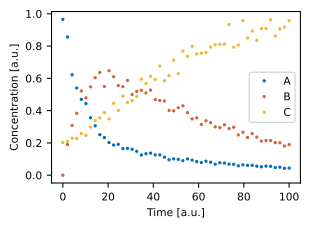
You can check if the data was loaded properly by plotting it using the
plot.plot_c() function:
from chemical_kinetics import plot

plot.plot_c(ds)
Fitting and displaying the fit results
We already defined the derivatives to be used by the fit in the derivatives function above. However, we also need to provide an initial guess for the time constants.
Note: In this case, only time constants constitute parameters stored in the p parameter of the derivatives() function. However, a different derivatives() function definition can require parameters that are not time constants. These parameters can still be passed in the p dictionnary, the parameters in p are not required to be time constant, they can be any parameter needed by the model.
These parameters are given as a dictionary (p in the derivatives() function definition) where the keys are the time constant names. The corresponding values are a dictionary containing the parameters, used to initialize a lmfit.Parameter object. The parameters that can be passed via this dictionary are in particular: value, vary, min, max and expr. Details on these parameters, and more generally on the lmfit.Parameter class can be found in the lmfit documentation.
parameters = {
    "k_1fw": dict(value = 0.1, min = 0),
    "k_1bw": dict(value = 0.1, min = 0),
    "k_2": dict(value = 0.1, min = 0)
}
Another parameter to be passed to the fit function are the initial concentrations. These are defined in a similar way as the parameters variable defined above, since they are also fit parameters. It is mandatory to give the same names for theses parameters as the corresponding names given to the columns in the .csv file that was loaded in your dataset object. If you do not declare a value for the initial concentration for one of the species tracked in your .csv file then this value will be the first concentration value from this file by default.
For demonstration, in this example we consider that: - the initial concentration of A is at least 0.5 and we default its initial value - the initial concentration of B is known and fixed to 0 - the initial concentration of C is unknown and we use a default value for this parameter by not declaring it at all. The default value is the initial concentration for C in the dataset
c0 = {
    "A": dict(min = 0.5),
    "B": dict(value = 0., vary = False)
}
We can now pass these parameters to the fit.fit_dataset()
function. Once the fit converged a message generated by the
lmfit.MinimizerResult class is displayed (see the lmfit
documentation for
details on this message significance).
from chemical_kinetics import fit

fit.fit_dataset(
    dataset = ds,
    derivatives = derivatives,
    parameters = parameters,
    c0 = c0
)
Fit succeeded.
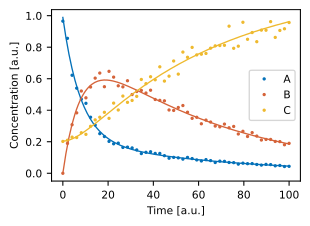
The fit results can be printed and plotted using respectively the
fit.print_result() and plot.plot_c() functions:
fit.print_result(ds)
| name | value | stderr | stderr/value % | init. val. | vary | min | max | |
|---|---|---|---|---|---|---|---|---|
| 0 | k_1fw | 0.103 | 0.002 | 1.95 | 0.1 | True | 0 | inf |
| 1 | k_1bw | 0.0211 | 0.000645 | 3.06 | 0.1 | True | 0 | inf |
| 2 | k_2 | 0.0197 | 0.000209 | 1.06 | 0.1 | True | 0 | inf |
| 3 | c0_A | 0.989 | 0.00758 | 0.767 | 0.965 | True | 0.5 | inf |
| 4 | c0_B | 0 | 0 | nan | 0 | False | -inf | inf |
| 5 | c0_C | 0.204 | 0.0045 | 2.2 | 0.202 | True | -inf | inf |
from chemical_kinetics import plot
plot.plot_c(ds)
For information, here is the code that was used to generate the raw data used in this example:
from chemical_kinetics import fit
import pandas as pd
import numpy as np
import lmfit

# Time constantsand initial concentrations definitions
params = lmfit.Parameters()
params.add("k_1fw", value = 0.1)
params.add("k_1bw", value = 0.02)
params.add("k_2", value = 0.02)
params.add("c0_A", value = 1)
params.add("c0_B", value = 0)
params.add("c0_C", value = 0.2)

# Generate time and concentration evolution over time
t = np.linspace(0,100,50)
c = fit.evaluate(derivatives, params, t)

# Add random noise
c += c*0.2*(np.random.random(c.shape) - 0.5)

# Create a DataFrame from t and c and save it as .csv
data = np.hstack((t.reshape(-1,1), c))
df = pd.DataFrame(columns = ["t", "A", "B", "C"], data = data)
df.to_csv(r"data/concentrations vs time.csv", index = False)